Blaž Kovačič, M.Sc.
Obstino – Assistive Technology Development Association
Date
September 2026
Abstract
In this paper we describe a practical approach of obtaining 3D facial landmarks, head pose estimation and eye tracking in Windows OS using C++.
For this purpose we’ve developed a simple library called libmpface. As the name suggest, it is based on the MediaPipe framework, specifically it is based on the corresponding tflite model for obtaining facial landmarks.
The library is very easy to use and is based on OpenCV and TensorFlow lite (specifically we use ValYouW/tflite-dist from github).
The library was developed as a part of Obstino – Assistive Technology Association.
As the library is improved, it is aimed at providing utility functions for programmers who want to develop accessibility and other useful applications.
Library open-source code can be found on the link below: https://github.com/obstino-org/libmpface
Introduction
Assistive techonology (AT) and accessibility is a field that eventually helps improve the quality of life for persons with disabilities.
There are many AT solutions that can help people. Some solutions may utilize physical switches to help people more easily control their device, eye tracking devices, gyroscopic mice. Additionally, the technology of artificial intelligence enables programmers to develop solutions that can track head movement or eye movement using the device camera. One example of this is the SmyleMouse, which tracks head movement and detects the smile facial gesture to enable Windows users to move the cursor and perform mouse click. Another similar solution is our Face Control Android application that detects facial movement to control the device.
Many web camera based solutions using frontal face image rely on AI models that can accurately detect important key points on the face. These points are known as facial landmarks (see example image below for the MediaPipe facial landmarks)
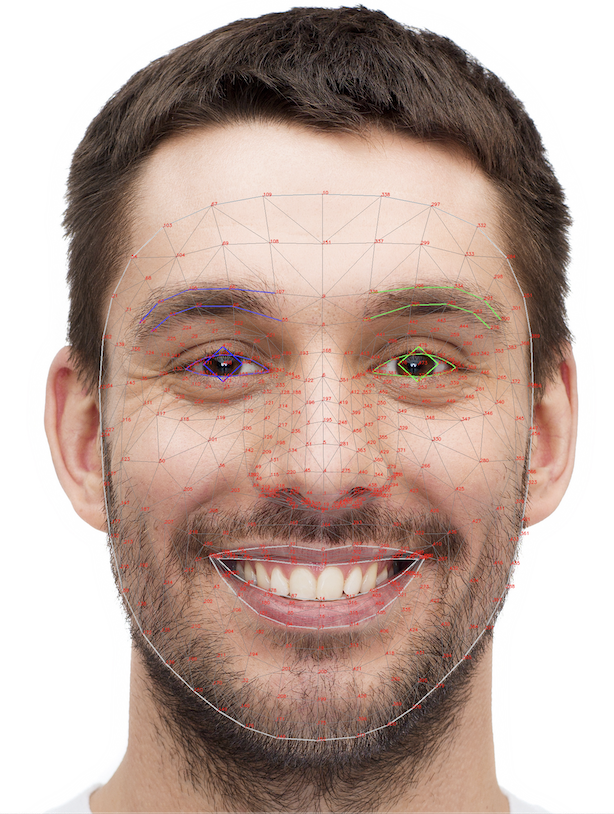
Figure 1: Facial landmark points for the MediaPipe head landmarks model (see here for full sized image).

We recognized that for facial landmark detection in C++, a common approach is with use of the dlib facial landmark detector. Dlib is straightforward to set up, however their landmark detector does not accurately predict landmark points for larger rotations of the head. Additionally, their solution doesn’t predict landmarks very well for facial occlusions. The dlib facial landmark model is also relatively large, consuming about 100MB of hard drive space.
With the development of AI head pose estimation neural network
models, alternative approaches become possible. One such approach is by
utilizing well-known MediaPipe
landmark detection AI models released by Google.
The benefits
of using MediaPipe facial landmark detection model are computational
efficiency, on-device support, public availability and documentation of
their corresponding TensorFlow lite models. Finally, it enables accurate
prediction 3D landmark points, which include eye gaze landmark
points.
Setting up the development environment
The development environment is relatively easy to set up on the Windows operating system using Visual Studio.
The environment in our work consists of:
- C++ development: Microsort Visual Studio Community 2022
- Computer vision library: OpenCV 3.4.18
- TensorFlow library: tflite-dist v2.2.0
- MediaPipe facial landmarks model: MediaPipe FaceLandmarker
- HAAR cascade head detection files: *“opencv3410_frontalface_default.xml”*
OpenCV was compiled manually using CMake GUI.
The library tflite-dist is already precompiled for Windows and contains the necessary .lib and .dll and include files for quick setup.
In URL provided above for the facial landmarks model, one can download the .task file, which is essentially a zip archieve that, when unzipped, amongst others contains the “face_landmarks_detector.tflite” tensorflow lite AI model. We use this model in our work.
Our approach
We created a single header library libmpface that can be used in the following way:
- to obtain 468 3-dimensional facial landmark points (easy to convert to 2d)
- compute normalized eye pupil position estimate (a number between -1.0 and +1.0)
- obtain experimental head pose (roll, yaw, pitch angles in degrees)
For this purpose, we have a header named libmpface.h with
the class FaceLandmarkDetector.
Some useful class methods
are the following:
- simple constructor
FaceLandmarkDetector() - landmark detection accepting webcam opencv color image frame
vector<cv::Point3f> detectLandmarks(cv::Mat& frame) - roll angle computation with
float computeRoll(vector<cv::Point3f> landmarks, bool degrees = true) - yaw angle computation with
float computeYaw(vector<cv::Point3f> landmarks, bool degrees = true) - pitch angle computation with
float computePitch(vector<cv::Point3f> landmarks, bool degrees = true) - normalized eye position computation with
cv::Point2f computeEyePosition(vector<cv::Point3f> landmarks, float outScaleX = 1.0f, float outScaleY = 1.0f)
There is also the following low-level method
pair<vector<cv::Point3f>, float> forward(cv::Mat imgFace).
This method is used internally by detectLandmarks.
Example usage of our library:
Here we show a simple example use of our library which computes and
draws facial landmark points using camera image.
The example also
computes roll, yaw and pitch angle approximates in degrees. It also uses
eye position to display on app window whether the user is looking left
or right (see figure below).
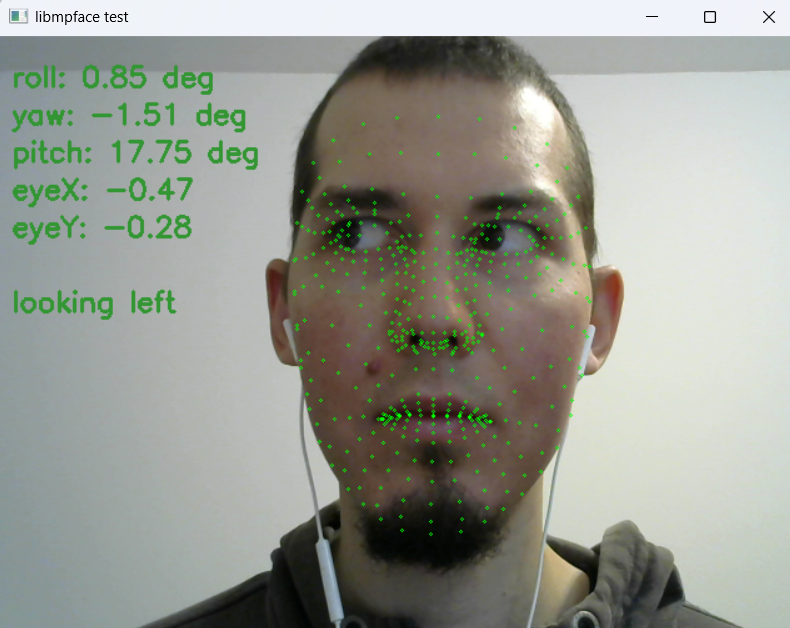
Figure 2: Demonstration of our libmpface example application.
C++ code for the example
#include "libmpface.h"

int main()
{
    cv::Mat frame;
    cv::VideoCapture cap(0, cv::CAP_DSHOW);
    FaceLandmarkDetector landmarkDetector;

    if (!cap.isOpened()) {
        cout << "error opening\n";
        return -1;
    }

    cout << "opened\n";

    while(true)
    {
        cap.read(frame);
        cv::flip(frame, frame, 1);

        if (frame.empty()) {
            cout << "frame empty" << endl;
            std::this_thread::sleep_for(100ms);
            continue;
        }

        auto pts = landmarkDetector.detectLandmarks(frame);
        if (!pts.empty()) {
            auto pts2f = landmarkDetector.vectTo2f(pts);
            for (int i = 0; i < pts2f.size(); i++)
                cv::circle(frame, pts2f[i], 1, cv::Scalar(0.0f, 255.0f, 0.0f), 1);

            float roll = landmarkDetector.computeRoll(pts);
            float yaw = landmarkDetector.computeYaw(pts);
            float pitch = landmarkDetector.computePitch(pts);

            cv::Point2f eyePos = landmarkDetector.computeEyePosition(pts, 1.0f, 1.0f);
            float xBias = -0.15f;
            eyePos.x -= xBias;

            string strRoll = std::format("roll: {:.2f} deg", roll);
            string strYaw = std::format("yaw: {:.2f} deg", yaw);
            string strPitch = std::format("pitch: {:.2f} deg", pitch);
            string strEyeX = std::format("eyeX: {:.2f}", eyePos.x);
            string strEyeY = std::format("eyeY: {:.2f}", eyePos.y);

            string strLR = "";
            if (eyePos.x <= -0.15f)
                strLR = "looking left";
            else if (eyePos.x >= 0.15f)
                strLR = "looking right";

            if (cv::waitKey(30) == 32)
                std::this_thread::sleep_for(3000ms);

            int yPos = 10;
            for (string s : vector<string>{ strRoll, strYaw, strPitch, strEyeX, strEyeY, "", strLR })
                cv::putText(frame, s, cv::Point(10, (yPos+=30)), cv::FONT_HERSHEY_SIMPLEX, 0.75, cv::Scalar(50.0f, 150.0f, 50.0f), 2);

        }

        cv::imshow("libmpface test", frame);

        if (cv::waitKey(30) == 27)
            break;
    }

    return 0;
}
Algorithm description
detectLandmarks class method
Below, we write the simplified pseudocode for the
high-level libmpface class method detectLandmarks
public faceRegion = {}

detectLandmarks(frame) {
    if(faceRegion.empty()) {
        faceRect = haarDetectFace(frame)
        if(!faceRect)
            return {};
        // expand rect height (above and below)-> total=150%
        faceRect2 = expandRectHeight(faceRect, 150%)
        faceRegion = faceRect2
    }

    if(faceRegion.empty())
        return {}

    imgFace1 = copyImageRect(frame, faceRegion)
    imgFace2 = resizeImage(imgFace1, Size(256, 256))

    {landmarks, score} = forward(imgFace2)
    if(score < 0.95) {
        faceRegion = {}
        return {}
    }

    // scale points from [0,256]x[0,256]
    // to [0,face1Width]x[0,face1Height]
    landmarks = scale(landmarks)
    // construct new faceRegion rect
    topLeft = findTopLeftPoint(landmarks)
    bottomRight = findBottomRightPoint(landmarks)
    faceRegion = Rect2f(topLeft, bottomRight);

    return landmarks;
}
computeRoll method
Head roll angle describes how much head is tilted sideways left or sideways right.
Roll computation in libmpface is done using
computeRoll. The method first computes a centroid of 3D
landmark points (obtained through detectLandmarks) as
follows: \[
c = \frac{1}{N} \sum_{i=0}^{N}{\text{landmark}(i)}
\]
Roll angle \(\alpha\) is computed using \(c\) and three other landmark points using the following formula:
\[\alpha = \frac{1}{3}\sum_{i\in \{8, 9, 151\}}\text{atan2}\left(v_y(i), v_x(i)\right)\] where \[v(i) = \text{landmark}(i)-c\]
Here atan2 is a two argument inverse arc function. We divide by 3 to obtain average of atan of three points. The landmark points 8, 9, and 151 correspond to a vertical line on head, as shown in figure below.
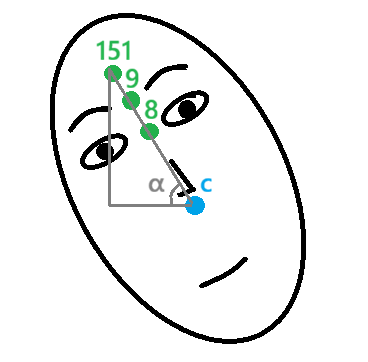
Figure 3: Select landmark points and centroid
computeYaw method
Yaw angle \(\beta\) is computed similarly using \(c\) and six other landmark points on the nosetip using the following formula:
\[\beta = \frac{\pi}{2} + \frac{1}{6} \times \sum_{i\in \{5, 4, 51, 281, 45, 275\}}\text{atan}\left(\frac{v_z(i)}{v_x(i)}\right)\] where \[v(i) = \text{landmark}(i)-c\]
Here, in atan function we use the \(z\) component (depth) and horizontal \(x\) (as in image plane) component of \(v(i)\). Points 5, 4, 51, 281, 45, and 275 correspond to landmarks that are nearby around the nosetip (green in figure below).
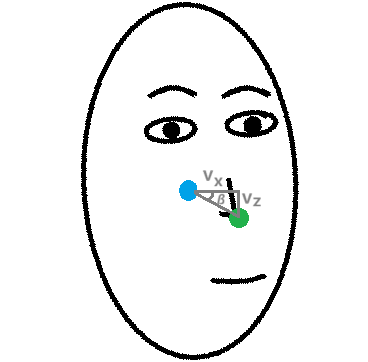
Figure 4: Select landmark points and centroid
computePitch method
Pitch angle \(\gamma\) is computed using \(c\) and six other landmark points on the nosetip using the following formula:
\[\gamma = \frac{1}{6} \times \sum_{i\in \{5, 4, 51, 281, 45, 275\}}\text{atan}\left(\frac{v_y(i)}{v_z(i)}\right)\] where \[v(i) = \text{landmark}(i)-c\]
Here, in atan function we use the \(z\) component (depth) and vertical \(y\) (as in image plane) component of \(v(i)\). Again, points 5, 4, 51, 281, 45, and 275 correspond to landmarks that are nearby around the nosetip (green in figure below).
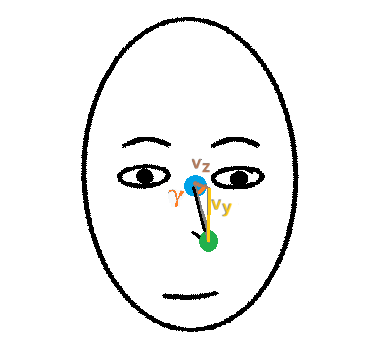
Figure 5: Select landmark points and centroid
computeEyePosition method
Mathematics behind eye position calculation (\(x_{eye}\) and \(y_{eye}\)) is shown below (optionally in code there are also scale factors for output values of x and y).
First, we define:
\(E = \text{landmark}(eyeIndex)\)
\(L = \text{landmark}(eyeLeftCornerIndex)\)
\(R = \text{landmark}(eyeRightCornerIndex)\)
\(T = \text{landmark}(eyeTopIndex)\)
\(B = \text{landmark}(eyeBottomIndex)\)
Note that only \(x\) and \(y\) image plane landmark components are used in vectors \(E\), \(L\), \(R\), \(T\) and \(B\) above.
Next, for horizontal eye position we have:
\[u_1 = \frac{R – L}{||{R – L}||}\]
\[v_1 = E-L\]
\[x_{eye} = \frac{u_1 \cdot v_1 }{||R – L||}\]
\[x_{eyeNorm} = 2(x_{eye} – 0.5)\]
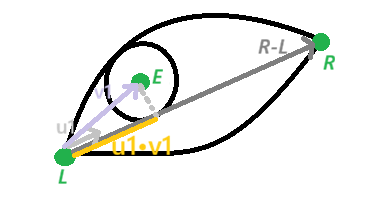
Figure 6: Left eye with vectors sketched for visual demonstration of horizontal eye position calculation.
As we can see in figure above, \(u_1 \cdot v_1\) is basically a horizontal projection of eye position \(E\) on the line between points \(L\) and \(R\). What \(x_{eyeNorm}\) results in is a normalized value for eye position, giving values between -1 and +1. In practice, however, the normalized position values may reach values of about 0.5 at eye at left and right boundary, since the pupil \(E\) is surrounded by the iris, which adds some space at the boundary positions.
Similarily, for the vertical eye position we have
\[u_2 = \frac{T – B}{||{T – B}||}\]
\[v_2 = E-B\]
\[y_{eye} = \frac{u_2 \cdot v_2 }{||T – B||}\]
\[y_{eyeNorm} = 2(y_{eye} – 0.5)\]
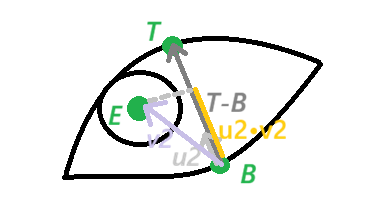
Figure 6: Left eye with vectors sketched for visual demonstration of vertical eye position calculation.
The mathematics is exactly the same as for horizontal eye position, except that different points are used in computation. The points used can be seen in figure above.
Conclusion
Here we presented our libmpface open source library. Our library’s main code is in a single header, written in Visual Studio C++. It is based on MediaPipe facial landmark detection models. It is simple to use, and enables accurate real-time acquisition of 468 3-dimensional facial landmark points.
These points can be passed to libmpface auxiliary methods to find approximate 3D head rotation angles – roll, yaw and pitch. Additionally, the library enables experimental support for eye position tracking, giving normalized output values.
The future work can include improvement and further testing of mentioned auxiliary methods, and use of this library in applicative assistive technology solutions.